
Plans and limits
What each plan includes, how X credits work, and how to change or cancel a plan.
Every workspace has its own plan: Free, Starter, Premium, or Agency. The price covers the whole workspace up to its limits, so eksis does not charge per channel or per seat. Current prices, in US dollars and in Rupiah, are on the pricing page. A yearly plan costs ten months instead of twelve.
What each plan includes
| Free | Starter | Premium | Agency | |
|---|---|---|---|---|
| Workspaces | 1 | 1 | 3 | 10 |
| Channels | 1 | 20 | 75 | 200 |
| Team seats | 1 | 2 | 10 | 30 |
| Scheduled posts a month | 15 | Unlimited | Unlimited | Unlimited |
| Daily posts per channel | Capped by eksis | Set by the network | Set by the network | Set by the network |
| Inbox history | 7 days | 30 days | 90 days | 365 days |
| Direct messages in the inbox | No | Yes | Yes | Yes |
| Active automations | 1 | Unlimited | Unlimited | Unlimited |
| AI requests a month | 15 | 300 | 1,000 | 3,000 |
| X credits a month | None | 15 | 100 | 300 |
| Media storage | 1 GB | 10 GB | 50 GB | 200 GB |
| Analytics | No | Yes | Yes | Yes, plus client reports |
| Post approval | No | Yes | Yes | Yes |
| REST API | No | Yes | Yes | Yes |
| MCP server for AI assistants | Yes | Yes | Yes | Yes |
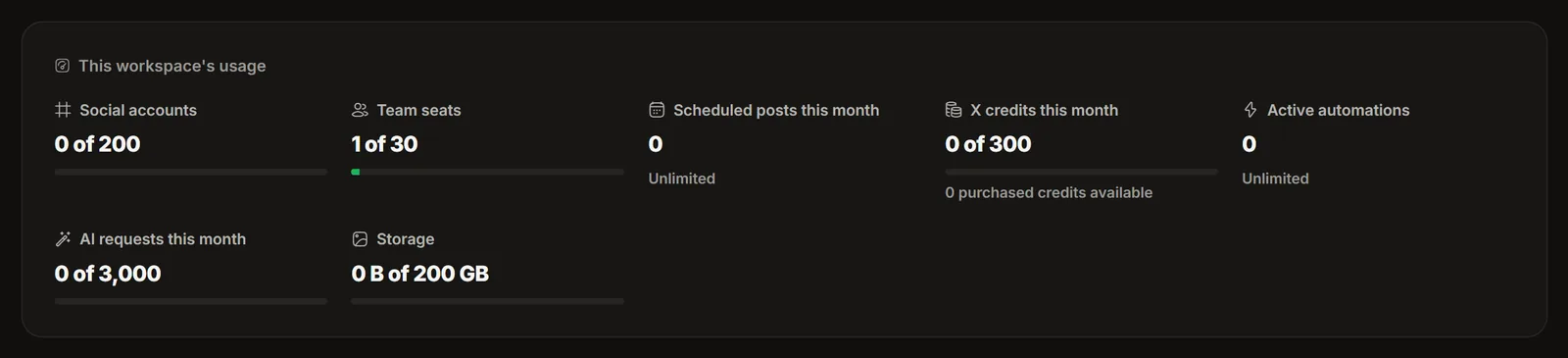
Settings, Plan and billing shows the limits of your workspace and how much of each you have used.
On Free, eksis caps how many posts one channel publishes in any 24 hours, for example 10 on TikTok and 25 on Instagram. Paid plans have no cap from eksis, only the limit each network sets. The numbers per network are in Platform specifications, and Settings, Capabilities shows them for your plan. A post over a daily limit does not fail: it waits until there is room and goes out later.
X credits
X charges eksis for every post, so posts to X use credits. A post without a link takes 1 credit, and a post with a link takes 13. Replies sent to X from the inbox use credits too. Monthly credits reset every calendar month, also on yearly plans.
When the monthly credits run out, buy a pack of 50, 100, or 500 on Settings, Plan and billing. Bought credits never expire and come on top of the monthly ones. Free has no X credits, so X channels start on Starter.
When you reach a limit
eksis shows what is locked and offers an upgrade, for example "The next account slot is locked" when every channel slot is in use. Nothing is deleted. If you move to a smaller plan, the channels or workspaces above the new limit become read-only until you choose which ones to keep.
Change your plan
Only the workspace owner can change the plan or pay for it.
Open the billing page
Go to Settings, then Plan and billing.
Pick the plan
Choose monthly or yearly, then Upgrade to a bigger plan or Switch to a smaller one.
Pay
Card payments go through Polar, eksis's merchant of record, which handles tax and emails the invoice. In Indonesia you can also pay with QRIS or a bank transfer. Each of those payments covers one month or one year and does not renew by itself, so eksis emails you before the period ends.
Have a code for a discount or a free plan? Enter it under Redeem code on the same page. Each code works once per workspace.
Cancel
Choose Manage billing on Plan and billing to open the Polar billing portal, and cancel the subscription there. The plan stays active until the end of the period you paid for, then the workspace moves to Free. Cancelling does not delete your data. A plan paid with QRIS or a bank transfer needs no cancelling: it ends on its own date.
To ask for a refund, write to support@eksis.io. The rules are in the Terms of Service, under "Billing, renewals, and refunds".