
Team and roles
Invite people to a workspace and decide what each of them can do.
A workspace can hold as many people as its plan has seats: 1 on Free, 2 on Starter, 10 on Premium, and 30 on Agency. eksis does not charge per seat, so the price stays the same however many seats you fill.
Invite someone
Open Members
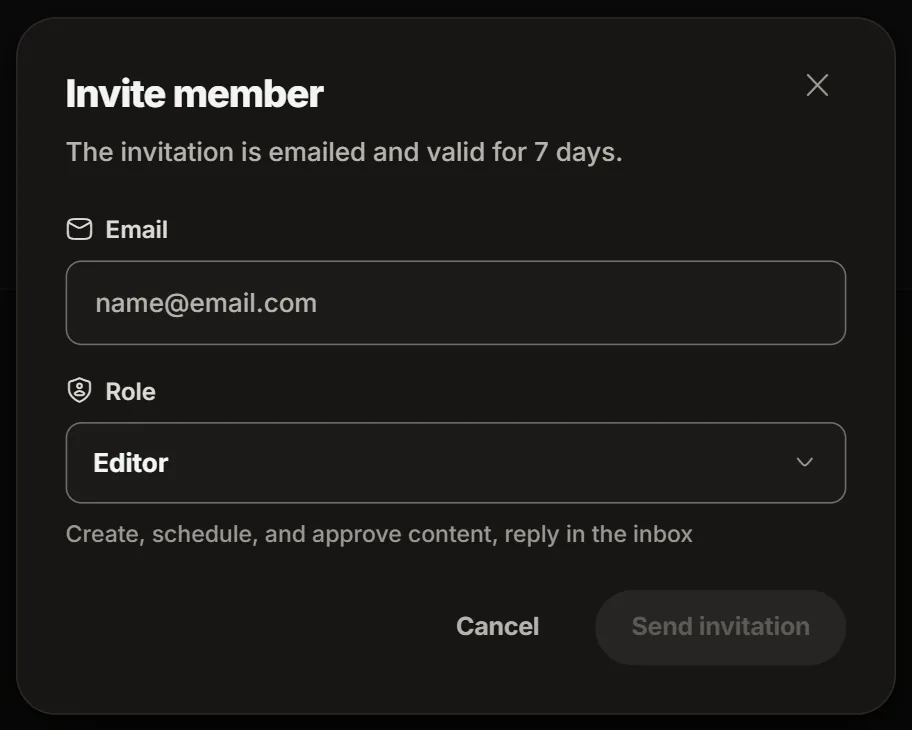
Go to Settings, then Members. Only owners and admins can invite.
Wait for them to accept
The invitation is emailed and valid for 7 days. The person has to sign in with the address you invited. Until then, the list shows "Invitation awaiting acceptance".
When every seat is used, eksis says "All seats on this plan are used."
The five roles
Each role can do everything the role above it in this table can, and more.
| Role | What it can do |
|---|---|
| Viewer | Read only: posts, the inbox, automations, Analytics, and the member list. |
| Contributor | Also writes posts and uploads media. Its posts wait for approval before they go out. |
| Editor | Also schedules, publishes, and deletes posts, approves contributors' posts, and replies, moderates, and assigns in the inbox. |
| Admin | Also invites and removes members, connects channels, manages automations, creates API keys and webhooks, and edits workspace settings. Everything except billing. |
| Owner | Everything, including billing and deleting the workspace. |
Change a role or remove someone
Owners and admins change a member's role from the Members list. Remove takes away their access at once, and the content they created stays. The workspace owner cannot be removed.
Good to know
- An API key also carries a role, and never has more access than the person who created it. See Authenticating.
- Premium and Agency hold more than one workspace, for example one per client. Each workspace has its own channels, members, and settings.